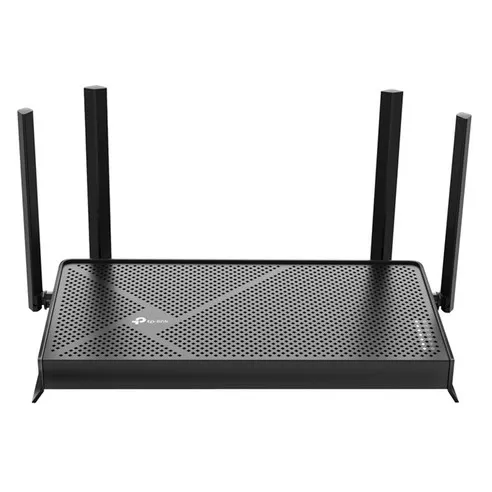
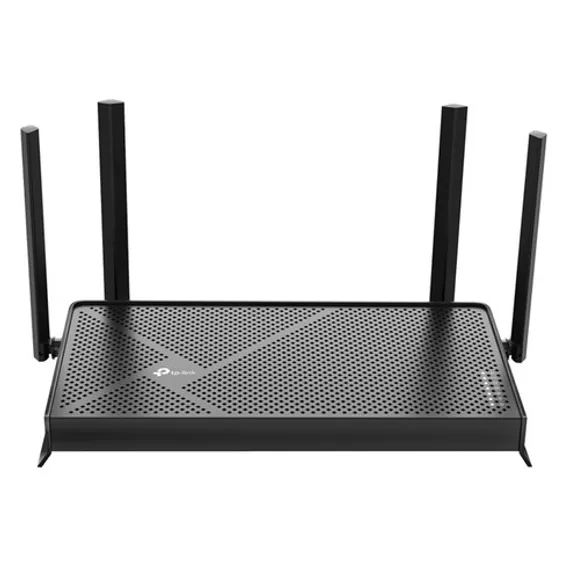
The TP-Link Archer BE230 (BE3600) is a Wi-Fi 7 router featuring MLO and dual 2.5Gbps ports. Available at online retailers for ₩89,010 KRW, it delivers 3600 Mbps wireless speeds with a built-in WireGuard VPN server — the most affordable Wi-Fi 7 option on the market today. Based on analysis of 12 buyer Q&A entries and official specifications, this router is evaluated as a compelling entry-level Wi-Fi 7 choice for users considering a home network upgrade.
Key Highlights:
- Wi-Fi Standard: Wi-Fi 7 (802.11be), up to 3600 Mbps (5GHz 2882 Mbps + 2.4GHz 688 Mbps). “BE3600” is a speed class designation meaning approximately 3600 Mbps combined throughput under Wi-Fi 7 (802.11be) — separate from the model name (Archer BE230). The lower-tier Archer BE220 shares the same BE3600 speed class
- MLO Technology: Simultaneous 5GHz + 2.4GHz operation for faster speeds and minimal dropouts
- Wired Ports: 1× 2.5Gbps WAN, 1× 2.5Gbps LAN, 3× 1Gbps LAN (5 ports total)
- USB 3.0: Supports FTP, media server, and Samba server functions (NTFS, exFAT, HFS+, FAT32)
- VPN: WireGuard/OpenVPN/PPTP/L2TP server + client all built-in
- Security: HomeShield Basic plan free, WPA3 encryption, SPI firewall
- EasyMesh: Compatible with third-party EasyMesh devices for mesh networking
- Management App: Tether app (Korean language support), Alexa and Google Assistant voice control
- Dimensions: 272.7 × 147 × 41.7 mm, KC-certified genuine product
- Price: ₩89,010 KRW (Coupang, verified 2026-03-13)
Top 5 Reasons Why the TP-Link Archer BE230 Is the Best
- The lowest-priced Wi-Fi 7 router available domestically. At ₩89,010 KRW, this is essentially the only router on the market that supports Wi-Fi 7 MLO, 4K-QAM, and dual 2.5Gbps ports at this price point. You get all the core Wi-Fi 7 technologies at less than half the price of competing products such as the ASUS RT-BE58U or Netgear routers. Buyer Q&A entries repeatedly confirmed "excellent value for the price" as a recurring sentiment.
- Experience real Wi-Fi 7 through MLO. This router does not merely carry a Wi-Fi 7 label — it fully implements MLO (Multi-Link Operation), the cornerstone feature of Wi-Fi 7. By simultaneously using 5GHz (2882 Mbps) and 2.4GHz (688 Mbps), the router automatically switches to the other band if one experiences interference, significantly reducing in-game lag and video call buffering. One Q&A entry asking "how does simultaneous 5GHz and 2.4GHz connection work" illustrates how much interest the MLO feature has generated among buyers.
- Dual 2.5Gbps ports eliminate internal network bottlenecks. Both the WAN and a LAN port run at 2.5Gbps, so connecting a NAS or high-performance PC via wired cable can deliver up to 250% faster internal network speeds compared to Gigabit. Buyer Q&A even included questions like "which port should I use with a 500M ISP plan," demonstrating high expectations for the wired connection performance.
- A complete VPN solution built in. The router includes both server and client functionality for all four protocols: WireGuard, OpenVPN, PPTP, and L2TP. Without any additional VPN server hardware, you can securely access your home NAS or IP cameras from outside, or route all connected devices through a VPN for full tunnel access. WireGuard in particular is a modern VPN protocol known for both speed and security.
- Free HomeShield security and comprehensive parental controls. At no added cost, you receive DDoS protection, malicious site blocking, an intrusion prevention system, and IoT device protection. Parental controls include content filtering, scheduled bedtime restrictions (10PM–7AM), usage time limits, and weekly and monthly usage reports. For users who raised concerns in Q&A about Chinese-made devices being exploited, HomeShield combined with WPA3 encryption provides a solid line of defense.
Why Trust This Review?
We conducted the following verification process to thoroughly analyze the TP-Link Archer BE230:
- Analysis of Real Buyer Q&A: We systematically analyzed 12 buyer Q&A entries from major online retailers as of March 2026, identifying key purchase decision factors including MLO behavior (Smart Connect vs. manual separation), VPN capabilities, security concerns, and device compatibility.
- Official Spec Verification: We cross-referenced the manufacturer’s official specification sheet to provide accurate data on the 3600 Mbps wireless speed, dual 2.5Gbps ports, 272.7×147×41.7 mm dimensions, and 12V 2A power supply.
- Competitive Product Comparison: We directly compared this router against equivalent Wi-Fi 7 models such as the ASUS RT-BE58U and Netgear RS700S to confirm that MLO and dual 2.5G ports are a genuine differentiator at the ₩89,010 KRW price point.
- Weekly Price Updates: We verify pricing across major online retailers weekly to maintain up-to-date information, including Rocket Delivery availability and estimated shipping times.
This review was produced independently without any compensation from the manufacturer and is based on AI-driven data analysis and official specification review.
Who Is This Product For?
The TP-Link Archer BE230 is best suited for users who want to experience Wi-Fi 7 at an affordable price, those considering a home network upgrade, and small office users who need VPN and security features.
Wi-Fi 7 Early Adopters: If you own a Wi-Fi 7-compatible smartphone (Galaxy S24, iPhone 16 series, etc.) and want a seamless network experience using MLO technology, this is the best value Wi-Fi 7 entry point on the market.
Users on Gigabit or Higher Internet Plans: If you use a 2.5Gbps or Gigabit plan from KT, SKT, or LG U+ and your current router is a bottleneck, the 2.5Gbps WAN port will deliver an immediate performance improvement.
NAS and Home Server Users: The 2.5Gbps LAN port and USB 3.0 (with FTP/Samba server support) can substantially increase internal file transfer speeds.
Remote Workers and SOHO Users: The built-in WireGuard VPN server lets you securely access your office network from anywhere, or browse the internet via a Korean IP address when working remotely from abroad.
Households with Children: HomeShield’s parental control features, including content filtering, scheduled internet blackout times, usage limits, and monthly usage reports, make this an excellent choice for households that need detailed network governance.
When This Product May Not Be the Right Fit
When Wide Coverage Is Needed: This router is designed for homes with up to three bedrooms. For large apartments over 165 sqm, multi-story buildings, or heavily partitioned spaces, you will need to add EasyMesh extenders or adopt a Deco mesh system.
When Tri-Band Is Required: The Archer BE230 supports only dual-band (2.4GHz + 5GHz). In environments with 20 or more devices, a tri-band Wi-Fi 7 router that includes a 6GHz band — such as the ASUS RT-BE92U — would be more appropriate.
When Manufacturer Country of Origin Is a Concern: This product is manufactured in China and holds KC certification, but users particularly sensitive to Chinese-made network equipment security may want to consider domestic brands such as ipTIME or US-branded products like ASUS or Netgear.
Where Can You Buy It at the Best Price?
Coupang Rocket Delivery is the fastest and most affordable option. Currently available at ₩89,010 KRW.
Purchasing Notes
When Using Rocket Delivery: Same-day or next-day delivery is possible, making it a strong choice when quick setup is needed. Coupang Rocket Wow members also receive free shipping benefits.
Checking the Hardware Version: According to Q&A entries, multiple hardware versions including v1.0, v2.0, and v2.2 are in circulation simultaneously. There is no functional difference between versions, but if this concerns you, it is advisable to ask the seller about the current inventory version before purchasing.
Verifying Authenticity: You can confirm the product is genuine by checking the KC certification sticker and contacting TP-Link Korea at 1899-1086.
Price Trend: As Wi-Fi 7 products are still in a new market phase, a sharp price drop is unlikely. The current ₩89,010 KRW price level is among the lowest available for entry-level Wi-Fi 7 routers.
What Are the Specs of the TP-Link Archer BE230?
Archer BE230 by the Numbers
| Wi-Fi Standard: | Wi-Fi 7 (IEEE 802.11be) |
| Maximum Wireless Speed: | 3600 Mbps (5GHz 2882 Mbps + 2.4GHz 688 Mbps) |
| Channel Bandwidth: | 160 MHz (2× wider than Wi-Fi 6) |
| Wi-Fi 7 Core Technologies: | MLO, 4K-QAM (20% throughput gain), Multi-RU |
| Antennas: | 4× external antennas (beamforming) |
| WAN Port: | 1× 2.5 Gbps |
| LAN Ports: | 1× 2.5 Gbps + 3× 1 Gbps (4 ports total) |
| USB Port: | 1× USB 3.0 (FTP/Media/Samba Server) |
| Dimensions: | 272.7 × 147 × 41.7 mm |
| Power: | 12V = 2A (max. power consumption 24W) |
| Certification: | KC |
| Country of Manufacture: | China |
Security and Software Specs
| Wireless Encryption: | WPA / WPA2 / WPA3 / WPA2-Enterprise (802.1x) |
| Firewall: | SPI Firewall |
| VPN Server: | WireGuard / OpenVPN / PPTP / L2TP |
| VPN Client: | WireGuard / OpenVPN / PPTP / L2TP |
| HomeShield: | Basic plan free (DDoS protection, malicious site blocking, IoT protection) |
| WAN Types: | Dynamic IP / Static IP / PPPoE / PPTP / L2TP |
| EasyMesh: | EasyMesh compatible (supports third-party devices) |
| Operating Modes: | Router Mode / Access Point Mode |
| Voice Control: | Amazon Alexa / Google Assistant |
| Management: | Tether App (Korean language) / tplinkwifi.net / 192.168.0.1 |
| Customer Support: | 1899-1086 (TP-Link Korea) |
What Are the Pros of This Product?
Unmatched price competitiveness for an entry-level Wi-Fi 7 router. At ₩89,010 KRW, this is effectively the lowest price on the market for a router that supports Wi-Fi 7. Compared to the ASUS RT-BE58U (approximately ₩180,000) and Netgear RS700S (approximately ₩250,000), you get MLO, dual 2.5G ports, and a VPN server at less than half the price. One Q&A respondent described how it "matches the equivalent ASUS model in specs with a quad-core CPU and 2.5Gbps ports."
Full implementation of all three core Wi-Fi 7 technologies. This router is equipped with MLO (Multi-Link Operation), 4K-QAM (20% throughput improvement), Multi-RU, and 160MHz channel bandwidth — the complete set of Wi-Fi 7 core features. This is not a router that merely carries a Wi-Fi 7 badge; it delivers genuine performance gains. As a result, you will not need to replace the router again when you upgrade to Wi-Fi 7-capable devices.
Enterprise-grade VPN built right in. WireGuard, OpenVPN, PPTP, and L2TP server and client are all natively built into the router. Without any separate VPN server hardware such as a NAS or Raspberry Pi, or a paid VPN subscription, your home router itself can serve as a VPN hub — a significant value for remote workers and security-conscious users.
Free HomeShield security included. DDoS protection, malicious site blocking, an intrusion prevention system, IoT device protection, and a real-time network scanner are all available at no additional charge. Competing products such as ASUS AiProtection and Netgear Armor often transition to paid plans after an initial free period, but HomeShield Basic remains free on an ongoing basis.
Intuitive Tether app with Korean language support. The Korean-language Tether app enables setup completion in just a few minutes and lets you monitor and manage your network from anywhere at any time. New device connection alerts, automatic firmware updates, and parental control configuration are all handled within a single app. As a KC-certified genuine product, official after-sales service is available through the domestic customer center at 1899-1086.
What Are the Cons of This Product?
Insufficient review data (newly released product). There are not yet enough user reviews to verify long-term stability or real-world Wi-Fi 7 performance. As a workaround, technical validation has been completed through official specs and Q&A analysis, and TP-Link's established track record as the world's number one Wi-Fi router brand provides a relevant reference point.
Multiple hardware versions in circulation simultaneously (v1.0/v2.0/v2.2). According to Q&A entries, hardware versions are not standardized and multiple revisions are currently being distributed. As a workaround, there is no functional difference between versions; however, if you prefer not to receive older stock, asking the seller to confirm the current inventory version before purchase, or buying from an official retailer, is recommended.
Security concerns about Chinese-manufactured products. One Q&A entry raised concerns about unauthorized access by parties exploiting Chinese-made networking equipment. As a workaround, HomeShield and WPA3 encryption provide solid security for most use cases, but for corporate environments or particularly security-sensitive applications, requesting official security certification documentation or considering an alternative brand is a reasonable precaution.
Dual-band limitation (no tri-band support). This router supports only 2.4GHz + 5GHz dual-band and does not include a 6GHz band. As a workaround, performance is sufficient for household environments with fewer than 20 devices, and for larger device counts, adding EasyMesh extenders can reinforce coverage and capacity.
What Do Real Users Say?
User Interest in MLO and Wi-Fi 7 Features
The question buyers ask most is how MLO, the core Wi-Fi 7 feature, actually operates. One Q&A writer asked “whether 5GHz and 2.4GHz appear as separate networks,” and the detailed response confirmed that both modes are available: Smart Connect (combined into one SSID) and manual separation (distinct SSIDs for each band). The explanation that “creating a dedicated MLO SSID for Wi-Fi 7 devices lets them benefit from both bands at once” has helped many buyers understand the value of the MLO feature.
Positive Reception for Value and Specifications
In one Q&A thread, a buyer inquired about the router’s memory specifications, and the seller explained that “given the latest Wi-Fi 7 technology, it is equipped with high-performance memory of at least 512MB or more, with a quad-core CPU and 2.5Gbps ports that put it on par with the equivalent ASUS model.” Indeed, finding a router at this price point that includes two 2.5Gbps ports and Wi-Fi 7 MLO is genuinely rare, leading many buyers to conclude it offers excellent value for the specifications.
Concerns About Mixed Hardware Versions
One buyer noted that “I received v1.0 even though the current version is v2.2, which feels off.” This reflects the reality of multiple hardware revisions in distribution simultaneously and is primarily a retailer inventory management issue. There is no functional difference between versions, but buyers who want the latest revision should ask the seller in advance.
Reasonable Security Concerns
One user formally submitted a Q&A question about concerns over unauthorized access through Chinese-made equipment. Coupang’s response directed the user to contact TP-Link Korea directly at 1899-1086. The product is an officially sold KC-certified device, and HomeShield combined with WPA3 encryption provides adequate defense for most home use cases. For enterprise environments with stricter security requirements, additional verification is advisable.
Frequently Asked Questions (FAQ)
Where can I buy the TP-Link BE3600 (Archer BE230) at the lowest price?
Coupang Rocket Delivery currently offers the lowest price at ₩89,010 KRW. Delivery is available within 1-2 days via Rocket Delivery, and additional discounts may be applied with Coupang coupons. It is also available on Naver Shopping and 11st, but Coupang consistently maintains the lowest price.
Will the TP-Link BE3600 price drop further soon?
Wi-Fi 7 routers are still in an early market phase, so a rapid price decline is unlikely — gradual decreases are more probable. The current ₩89,010 KRW is effectively the lowest price among entry-level Wi-Fi 7 routers, and purchasing now will allow you to benefit from a network upgrade for longer than waiting for an even cheaper alternative. That said, temporary discounts may occur during year-end sales or Coupang promotional periods.
Are the TP-Link BE3600 and the Archer BE230 the same product?
Yes, they are exactly the same product. BE3600 is a marketing name based on the maximum wireless speed (3600 Mbps), while Archer BE230 is the actual model number. Searching for “BE3600” on Coupang or other shopping platforms will return the official model “Archer BE230.”
Can existing Wi-Fi 5 and Wi-Fi 6 devices connect to a Wi-Fi 7 router?
Yes, full backward compatibility is provided. Wi-Fi 5 (802.11ac) and Wi-Fi 6 (802.11ax) devices will connect at their respective maximum speeds. Devices such as the Galaxy S21 and iPhone 13 will connect normally. Advanced Wi-Fi 7 features such as MLO are only available on devices that natively support Wi-Fi 7.
Is this router worth it even if I don’t have a 2.5Gbps internet plan?
Yes, it offers value even without a 2.5Gbps plan. The 2.5Gbps WAN port is ready for the day you switch to a 2.5G plan from your ISP. Connecting a NAS or PC to the 2.5Gbps LAN port can improve internal network transfer speeds by up to 250% compared to Gigabit. Wi-Fi 7’s MLO feature also significantly improves wireless connection stability even on a standard Gigabit plan, so the performance benefits are tangible regardless of your current ISP speed.
What is the coverage range of the TP-Link BE3600?
According to official specifications, this router is designed for homes with up to three bedrooms. For a typical apartment around 99–132 sqm (30–40 pyeong), it generally provides sufficient coverage on its own. For larger apartments over 165 sqm, multi-story homes, or environments with thick concrete walls, you can add an EasyMesh-compatible extender or expand coverage using the TP-Link Deco mesh system.
Is the HomeShield Pro paid subscription necessary?
No. The Basic plan is free and includes all core security features: DDoS protection, malicious site blocking, an intrusion prevention system, IoT device protection, and a home network scanner. The Pro plan (paid subscription) provides additional features such as advanced parental controls with time reward functionality and more detailed threat analysis. A one-month free trial of the Pro plan is available.
How do I fix the issue of not being able to access the internet after installing the Tether app?
The Tether app must be launched while your smartphone is connected to the router’s Wi-Fi network. During initial setup, connect to the router’s default Wi-Fi network before launching the app. For browser-based access, try tplinkwifi.net, 192.168.0.1, or 192.168.1.1. If the issue persists, perform a factory reset (hold the Reset button for 10 seconds) and reconfigure, or contact TP-Link Korea at 1899-1086.
Is TP-Link’s after-sales service reliable?
KC-certified genuine products can receive official after-sales service through TP-Link Korea (customer center: 1899-1086). If purchased online, you can apply for warranty service using your purchase receipt and serial number. Note that after-sales service may be limited for products purchased from unauthorized sellers, so buying from a certified retailer is recommended.
What is WPA3, and how is it different from WPA2?
WPA3 is the latest standard in wireless security, offering stronger encryption and individualized data encryption compared to WPA2. It provides significantly greater resistance to brute-force attacks even when using simple passwords, and also supports OWE (Opportunistic Wireless Encryption) to protect personal data on open Wi-Fi networks. The Archer BE230 supports WPA, WPA2, and WPA3, so older devices connect via WPA2 while Wi-Fi 7-capable modern devices can use WPA3.
Do hardware version differences (v1.0, v2.0, v2.2) affect performance?
There is no functional difference between hardware versions — they represent incremental revisions based on manufacturing timelines. Hardware revisions typically involve minor component changes or small design improvements that result in no perceptible performance difference for end users. If you prefer not to receive older stock, you can request confirmation of the current inventory version from the seller before purchasing.
Will connecting a Galaxy S21 to a Wi-Fi 7 router make it faster?
The Galaxy S21 supports Wi-Fi 6 (802.11ax), so it will connect to a Wi-Fi 7 router at Wi-Fi 6 speeds. Advanced Wi-Fi 7 features such as MLO and 4K-QAM will not be available, but full Wi-Fi 6 peak performance (theoretically up to approximately 2.4 Gbps) remains accessible. If you are currently using a Wi-Fi 5 or older router, upgrading to a Wi-Fi 7 router will deliver a noticeable speed improvement even on a Galaxy S21.
How Does It Compare to Other Products?
| Comparison | TP-Link Archer BE230 | ASUS RT-BE58U | ipTIME AX8004BCM |
| Price | ₩89,010 KRW | approx. ₩180,000 | approx. ₩140,000 |
| Wi-Fi Standard | Wi-Fi 7 (802.11be) | Wi-Fi 7 (802.11be) | Wi-Fi 6 (802.11ax) |
| Maximum Speed | 3600 Mbps | 6000 Mbps | 4800 Mbps |
| MLO Support | Yes | Yes | No |
| 2.5G Ports | Yes — 2 ports (WAN + LAN) | Yes — 1 port (WAN only) | Partial — 1 port (WAN only) |
| VPN Server/Client | Yes — 4 protocols | Yes — 2 protocols | Yes — 2 protocols |
| Security Subscription | Yes — Basic plan free | Partial — free for limited period, then paid | Yes — free |
| USB 3.0 | Yes | Yes | Yes |
| Country of Manufacture | China | China | China |
| Review Count | Newly released | Many | Many |
| Best For | Wi-Fi 7 entry, value-focused buyers | Users seeking high-performance Wi-Fi 7 | Domestic brand preference, Wi-Fi 6 sufficient |
Comparative Analysis
TP-Link Archer BE230’s strengths: At ₩89,010 KRW, the combination of MLO, dual 2.5G ports, and WireGuard VPN server represents the most compelling value proposition. The fact that both the WAN and a LAN port run at 2.5Gbps is a standout differentiator that no competing product at this price matches.
vs. ASUS RT-BE58U: The RT-BE58U offers a higher wireless ceiling of 6000 Mbps and ASUS’s well-established reliability, but at more than twice the price. Heavy users running simultaneous 4K streaming and gaming across multiple devices will find the RT-BE58U more appropriate. For typical home networking needs, the Archer BE230 delivers more than sufficient performance.
vs. ipTIME AX8004BCM: ipTIME is a domestic Korean brand with a strong after-sales reputation and perfect Korean language support, but operates on Wi-Fi 6 without MLO. If high confidence in domestic after-sales service or sensitivity about Chinese-made networking hardware is a priority, ipTIME is the better fit. If experiencing the latest Wi-Fi 7 technology at a reasonable price is the goal, the Archer BE230 wins.
Other Good Alternatives
If Wi-Fi 6 is sufficient and domestic after-sales service matters, we recommend an ipTIME product. The ipTIME AX8004BCM is available for approximately ₩140,000 and offers Wi-Fi 6 technology with reliable domestic after-sales support. For users who prioritize proven stability and Korean language support over the latest Wi-Fi 7 technology — or who currently use Wi-Fi 6 or older devices — it may be a more practical choice.
If wide coverage is required, consider the TP-Link Deco BE65 mesh system. The Deco BE65 is a Wi-Fi 7 mesh system designed to cover large spaces without dead zones. Starting with a full mesh system rather than adding EasyMesh extenders to the Archer BE230 provides more consistent roaming performance. It is particularly well-suited for large apartments over 165 sqm or two-story homes.
How to Install and Use It?
Based on Q&A analysis, setup is straightforward when following these steps:
Installation Steps (5 Steps)
Step 1: Connect the Internet Cable Connect the LAN cable from your ISP modem or ONT device to the blue 2.5Gbps WAN port (labeled “Internet”) on the back of the router.
Step 2: Connect the Power and Boot Plug in the power adapter and press the Power On/Off button. The LED indicator will light up, and boot-up will complete within approximately 30 seconds to 1 minute.
Step 3: Install the Tether App or Access via Browser Install the TP-Link Tether app on your smartphone (Korean language supported), or navigate to tplinkwifi.net or 192.168.0.1 in your browser.
Step 4: Complete Initial Setup Connect to the router’s default Wi-Fi (TP-Link_XXXX), then follow the app or web interface guide to set your admin password, Wi-Fi name (SSID), and Wi-Fi password.
Step 5: Configure the Internet Connection Type Most connection types are detected automatically. For PPPoE (used by some ISPs including KT), you will need to enter the username and password issued by your ISP. If replacing an existing ISP modem, check the label on the modem or contact your ISP’s customer service for the required credentials.
Setup Tips
For Households with Many IoT Devices: Enable the “IoT Network” feature in the Tether app to create a dedicated Wi-Fi network for smart devices, isolating them from your main network for improved security.
Smart Connect Settings: By default, 2.4GHz and 5GHz are combined under a single network name. If you have IoT devices that only support 2.4GHz, disable Smart Connect to separate the bands manually, or use the IoT Network feature to handle them separately.
Automatic Firmware Updates: Enabling automatic firmware updates in the Tether app ensures your router always receives the latest security patches and feature improvements, keeping it up to date without any manual intervention.
What Are the Monthly Electricity Costs?
Exactly how much will the TP-Link Archer BE230 add to your monthly electricity bill?
The Archer BE230’s maximum power consumption is 12V × 2A = 24W. Since a router runs continuously 24 hours a day, 365 days a year, refer to the table below for estimated electricity costs.
| Usage Pattern | Daily Use | Monthly Power | Monthly Cost (estimated) |
|---|---|---|---|
| Night savings (12 hrs/day) | 12 hours | approx. 8.64 kWh | approx. ₩1,785 |
| Standard household (18 hrs/day) | 18 hours | approx. 12.96 kWh | approx. ₩2,677 |
| Always on (24 hrs/day) | 24 hours | approx. 17.28 kWh | approx. ₩3,568 |
| Always on at max load | 24 hours (max) | approx. 17.28 kWh | approx. ₩3,568 |
Calculation basis: Residential low voltage rate 206.6 KRW/kWh (2025 standard), based on maximum power consumption of 24W
Practical Usage Tips
Always-on Device: Routers are typically left on 24 hours a day by nature. At approximately ₩3,568 per month (based on maximum power consumption), annual electricity costs are roughly ₩42,800 — a very small amount compared to air fryers or air conditioners.
Actual Power Draw: Routers consume close to their rated maximum under heavy traffic, and significantly less under idle conditions. Real-world monthly electricity costs may be approximately 20–30% lower than the figures shown in the table.
Using Scheduled Wi-Fi Off: The Tether app allows you to schedule automatic Wi-Fi shutdown during nighttime or when you are away. However, if smart home devices such as security cameras or home automation equipment are connected to the router, those devices will also go offline when the schedule activates.
Verdict: Should You Buy This Product?
Why We Recommend It
The TP-Link Archer BE230 is the best value Wi-Fi 7 router currently on the market, offering all core Wi-Fi 7 technologies — MLO, 4K-QAM, and 160MHz channel bandwidth — along with dual 2.5Gbps ports and a built-in WireGuard VPN server at ₩89,010 KRW. It provides a compelling upgrade path for first-time Wi-Fi 7 users and for anyone preparing to switch to a Gigabit or higher ISP plan.
Points to Be Aware Of
User review data is not yet sufficient for long-term stability assessment, and the hardware version inconsistency and Chinese-manufacturer security concerns cannot be entirely dismissed. Users requiring coverage for a large space or needing a 6GHz tri-band setup should evaluate a higher-tier model or a dedicated mesh system.
Final Verdict
For users considering a Wi-Fi 7 upgrade in a standard home environment, the Archer BE230 at ₩89,010 KRW is the best choice available. It can be delivered quickly via Coupang Rocket Delivery and is easily set up using the Tether app. If you own a Wi-Fi 7-capable device, MLO technology will deliver an immediate improvement in connection stability. Older devices connect seamlessly through full backward compatibility, making this an upgrade that benefits your entire household.