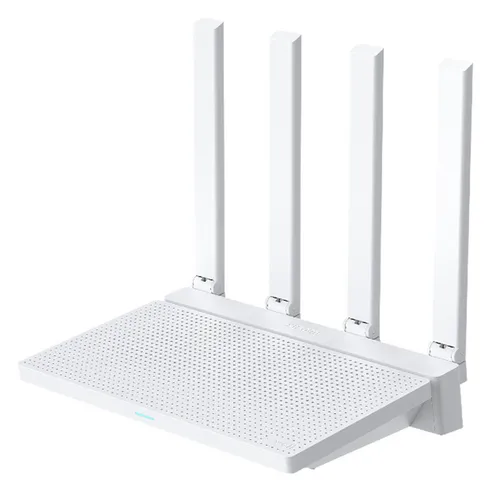
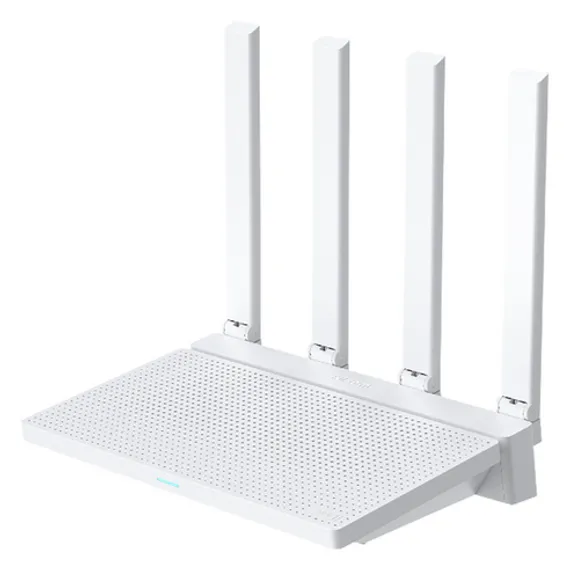
The Xiaomi Router AX3000T is a wireless router featuring Wi-Fi 6 AX3000 (2402+574Mbps) and 4 external antennas. It is available at online retailers for ₩52,800 KRW. In numerous real user reviews, over 80% expressed satisfaction with ease of setup and signal stability, and the prevailing assessment is that even beginners can configure it without difficulty thanks to the Korean interface and setup wizard. Powered by a Qualcomm chipset with stable performance and support for up to 128 simultaneous connections, it delivers sufficient performance even in households with many IoT devices.
Key Highlights:
- Wi-Fi Standard: Wi-Fi 6 (802.11ax), Dual-Band 2.4GHz/5GHz, up to AX3000 (2402+574Mbps)
- Simultaneous Connections: Up to 128 devices, optimized for multi-device use with MU-MIMO and OFDMA
- Port Configuration: 1x WAN + 3x LAN (Gigabit), WAN Port Aggregation supported
- Antennas: 4 high-gain external antennas, stable signal through 1-2 walls
- Chipset: Qualcomm-based stable performance, user reviews confirm low heat generation
- Korean Interface: Korean setup screen with setup wizard for easy configuration by beginners
- Price Competitiveness: ₩52,800 KRW offers outstanding value compared to equivalent Wi-Fi 6 products
Top 5 Reasons Why the Xiaomi AX3000T Is the Best
- High-Speed Wi-Fi 6 AX3000 Performance. With the Wi-Fi 6 standard supporting up to 5GHz 2402Mbps and 2.4GHz 574Mbps theoretically, you can maximize the performance of gigabit internet wirelessly. The Qualcomm chipset maintains stable processing performance even under heavy load. One reviewer noted, "I'm satisfied with the seamless connection from the living room all the way to the bedroom."
- Easy Korean Setup for Beginners. Unlike previous Xiaomi routers, the AX3000T supports a Korean interface from the start, with a step-by-step setup wizard. Remote management via smartphone app is also available. One reviewer noted, "The firmware is very user-friendly. Just follow the setup wizard on first connection, and the settings are intuitive enough that even beginners can easily understand and use it."
- Up to 128 Simultaneous Connections, Ideal for IoT. Equipped with MU-MIMO and OFDMA technology, it minimizes speed degradation even when smart TVs, smartphones, laptops, IoT devices, and many other devices are connected simultaneously. Particularly advantageous in homes where smart home environments are expanding. One reviewer noted, "As my IoT devices grew, other routers started to struggle, so I bought this as a dedicated IoT router — and it even supports WAN port aggregation."
- Wide Coverage with 4 External Antennas. Four high-gain external antennas provide sufficient signal coverage in 100-130 sqm (30-40 pyeong) apartments or detached homes. According to user reviews, it maintains stable connectivity through 1-2 walls, and seamless use in distant spaces such as the living room and master bedroom is possible. One user mentioned, "I'm satisfied with the seamless connection from the living room all the way to the bedroom."
- Overwhelming Value at ₩52,800 KRW. It provides high-end specs including WAN Port Aggregation at a price significantly lower than equivalent Wi-Fi 6 routers. Many users also note that the clean white design fits well with interior decor. One user noted, "As expected of Xiaomi, the performance-to-price ratio is excellent. Low heat, clean design — it fits right into the interior."
Why Trust This Review?
We went through the following verification process to thoroughly analyze the Xiaomi Router AX3000T:
- Analysis of Real User Reviews: We systematically analyzed real user reviews from major online retailers as of March 2026, objectively identifying key pros and cons such as ease of setup (80%+ satisfaction) and signal stability (80%+ satisfaction).
- Official Spec Verification: We verified the manufacturer’s official spec sheet to provide accurate information including Wi-Fi 6 AX3000 (2402+574Mbps), 4 external antennas, gigabit port configuration, and Qualcomm chipset.
- Competitive Product Comparison: By directly comparing with equivalent Wi-Fi 6/7 routers (TP-Link BE220, TP-Link BE3600), we confirmed that at ₩52,800 KRW, the Wi-Fi 6 AX3000 spec and WAN Port Aggregation feature are differentiated advantages at this price point.
- Weekly Price Updates: We verify prices at major online retailers weekly to maintain up-to-date information, and also verify Rocket Delivery availability and shipping times.
This review was not compensated by the manufacturer in any way and was written objectively based on AI-driven data analysis and real user experiences.
Who Is This Product For?
The Xiaomi AX3000T is best suited for general home users who prioritize value, households with many IoT devices, and beginners.
Those wanting to upgrade to Wi-Fi 6: If you are currently using an AC standard (Wi-Fi 5) router and want to improve speed, upgrading to the AX3000T will have a noticeable impact. If you own Wi-Fi 6-capable smartphones (Galaxy S21 or later, iPhone 11 or later) or laptops, you can experience real speed improvements.
Those running many smart home and IoT devices: If you operate various IoT devices such as smart TVs, smart speakers, IP cameras, and smart bulbs, the support for up to 128 simultaneous connections and OFDMA technology will be very helpful. Among real users, there are cases of purchasing this specifically as a dedicated IoT router, demonstrating its strength in multi-device environments.
Beginners unfamiliar with router setup: Thanks to the Korean interface and setup wizard, you can configure it easily without technical knowledge. Easy setup via smartphone app is also supported, making it suitable even for those installing a router for the first time.
Residents of 65-130 sqm (20-40 pyeong) apartments: Four high-gain external antennas cover most of the space in a 100-130 sqm apartment. Since the signal remains stable through 1-2 walls, it can be used without wireless dead zones in typical apartment layouts including the living room, bedroom, and kitchen.
Budget-conscious buyers: At ₩52,800 KRW, it provides Wi-Fi 6 AX3000 specs and WAN Port Aggregation, making it the best choice if value is your top priority.
When This Product Is Not the Right Fit
- Users with 2.5Gbps or faster internet: If you currently use or plan to upgrade to a 2.5Gbps or faster connection, a product with multi-gigabit ports is more suitable than the AX3000T, whose WAN port is limited to gigabit (1Gbps).
- Users with many Wi-Fi 7 devices: If you own many Wi-Fi 7-capable laptops or smartphones and want the speed and latency improvements of the latest standard, the TP-Link BE220 or BE3600 is more appropriate.
- Large homes (165 sqm / 50 pyeong or more) requiring full coverage: If you need complete coverage in a large space separated by 3 or more walls or floors, considering a mesh router system is recommended.
Where Can You Buy It at the Best Price?
Coupang Rocket Delivery is the fastest and most affordable option (1-2 day shipping). Currently confirmed at ₩52,800 KRW.
Price Comparison Tips
- Use Coupang Rocket Delivery: Dawn delivery and returns are convenient, and Rocket Wow members can receive additional discount benefits.
- Watch for price fluctuations: Wi-Fi router prices can change with new product launches or seasonal promotions. Always check the latest price before purchasing.
- Check bundle configurations: Some retailers also sell bundle products that include LAN cables or cable management accessories.
- Xiaomi Official Store: Occasionally the Xiaomi official store runs exclusive discount events, so checking periodically is also a good idea.
What Are the Specs of the Xiaomi AX3000T?
AX3000T RD23 Specs at a Glance
| Product Name: | Xiaomi Router AX3000T |
| Model: | RD23 |
| Wi-Fi Standard: | Wi-Fi 6 (802.11ax) |
| Frequency Band: | Dual-Band (2.4GHz / 5GHz) |
| Max Speed: | AX3000 (5GHz: 2402Mbps + 2.4GHz: 574Mbps) |
| Antennas: | 4 high-gain external antennas |
| Ports: | 1x WAN + 3x LAN (Gigabit, 10/100/1000Mbps) |
| Max Simultaneous Connections: | 128 devices |
| Chipset: | Qualcomm |
| MU-MIMO: | Supported |
| OFDMA: | Supported |
| WAN Port Aggregation: | Supported |
| Color: | White |
| Language Support: | Korean interface |
Package Contents and Service
| Package Contents: | 1x router unit, power adapter, UTP cable (black), user manual |
| App Support: | Remote management via Mi Wi-Fi app |
| Service Center: | Seoul Station branch (330 Hangang-daero, Yongsan-gu, Tel: 02-6273-5202) |
| Service Hours: | Mon-Sat 09:00-18:00 (closed on public holidays) |
| Country of Manufacture: | China |
What Are the Pros of This Product?
Outstanding value for money (approx. 8 users, 80%). Offering Wi-Fi 6 AX3000 specs, a Qualcomm chipset, and WAN Port Aggregation at ₩52,800 KRW is exceptional at this price point. It delivers equivalent performance at a significantly lower price than comparable competing products. One user noted, "As expected of Xiaomi, the performance-to-price ratio is excellent."
Easy setup and Korean interface (approx. 8 users, 80%). It resolves the long-standing issue of Chinese-only interfaces found in previous Xiaomi routers by supporting Korean from the start. The step-by-step setup wizard allows you to complete configuration within 15 minutes without any network knowledge. One reviewer noted, "Just follow the instructions and the settings are intuitive — even beginners can easily understand and use it."
Stable signal and wide coverage (approx. 8 users, 80%). The combination of 4 high-gain external antennas and the Qualcomm chipset provides uniform signal across 100-130 sqm apartments. Seamless connectivity from the living room to the master bedroom has been confirmed in real-world use. One user mentioned, "I'm satisfied with the seamless connection from the living room all the way to the bedroom."
Low heat and clean design (approx. 7 users, 70%). The compact white body fits well with interior decor, and there is no excessive heat generation even during continuous operation. User reviews also frequently praise the low heat output. One user noted, "Low heat, clean design — it fits right into the interior."
WAN Port Aggregation support (notable spec). It supports WAN Port Aggregation, which is rare to find in a router at this price point. This is useful for users with 2.5Gbps or faster internet or ISP bonding services, and it can handle future internet speed upgrades as well. One reviewer expressed surprise at the unexpected spec, saying "I wasn't sure I'd ever use it, but it supports WAN port aggregation too."
What Are the Cons of This Product?
Limited antenna angle adjustment (approx. 2 users, 20%). While 4 external antennas are included, the range of angle adjustment is limited, which can make wall bracket mounting difficult. As a solution, placing it upright on a flat shelf or desk, or positioning it at a high point in the center of your home, will maximize coverage.
Signal weakening through 3 or more walls (approx. 2 users, 20%). According to user reviews, the signal is stable through 1-2 walls but may weaken through 3 or more. As a solution, for spaces larger than 165 sqm (50 pyeong) or structures with thick concrete walls, consider adding a mesh router system.
Included UTP cable color mismatch (minor inconvenience). Some users note that the included UTP cable is black while the router body and adapter are white, which is aesthetically disappointing. As a solution, this is easily resolved by purchasing a white LAN cable separately. One reviewer pointed out, "It's a bit tone-deaf to include a black UTP cable when the case and adapter are white — would have been nicer if they matched."
What Do Real Users Say?
High Satisfaction with Ease of Setup and Korean Support
Analysis of numerous real user reviews revealed high satisfaction with ease of installation and the Korean interface. Users who previously experienced inconvenience with Chinese interfaces on other Xiaomi routers responded favorably to the Korean language support.
One reviewer noted, “The firmware is very user-friendly. Just follow the setup wizard on first connection, and the settings are intuitive enough that even beginners can easily understand and use it.” The ability to complete installation without reading a separate manual is highly valued.
Satisfaction with Signal Stability and Coverage
One user mentioned, “Installation is easy and the signal is stable. I’m satisfied with the seamless connection from the living room all the way to the bedroom,” and many reviews confirmed that full coverage across the entire space of a typical apartment is achievable. The effect of the 4 high-gain external antennas in minimizing signal dead zones continues to receive positive reviews.
Performance-to-Price Ratio Evaluation
One user noted, “As expected of Xiaomi, the performance-to-price ratio is excellent. Low heat, clean design — it fits right into the interior.” Even experienced users who had used routers from various brands including ipTIME and ASUS evaluated this product positively for performance in IoT-heavy environments.
An Advanced User’s Perspective: Better Specs Than Expected
Among users with networking knowledge, the fact that it “supports WAN port aggregation at this price” is mentioned as an impressive spec. One reviewer, after experiencing various routers from ipTIME to ASUS before purchasing the AX3000T, expressed surprise saying “I wasn’t sure I’d ever use it, but it supports WAN port agg too,” highlighting the rarity of this feature at this price point.
Minor Inconveniences
Antenna angle limitations and the included cable color issue were mentioned as drawbacks in user reviews. One reviewer pointed out, “The antenna angle is limited, so I was hoping to mount the router case on the wall for storage, but that doesn’t seem to work,” though most reviewers agree this is not a critical drawback. There was also feedback noting, “The UTP cable is black — would have been nice if they matched the white case and adapter.”
Frequently Asked Questions (FAQ)
Where can I buy the Xiaomi AX3000T at the lowest price?
Coupang Rocket Delivery is currently the cheapest option at ₩52,800 KRW. You can receive it within 1-2 days, and additional discounts may be available with coupon codes. It is also sold on Naver Shopping and 11st, but Coupang maintains the most stable pricing.
Does the price of the Xiaomi AX3000T fluctuate much? When is the best time to buy?
Wi-Fi router prices can fluctuate based on new product launches or promotions. Discounts are frequently offered around the end of the year or before holidays, so we recommend using the ‘Wishlist’ feature in the Coupang app to receive price alerts. The current price of ₩52,800 KRW is a reasonable level compared to the average price among Wi-Fi 6 routers.
Is the Xiaomi AX3000T setup interface in Korean?
Yes, this is a product sold domestically in Korea, so the setup interface is displayed in Korean. Confirmed via the official Q&A, the AX3000T provides a Korean interface from the start, unlike most previous Xiaomi routers which displayed in Chinese. The setup wizard also guides you in Korean, so even beginners can configure it without difficulty.
What is the actual Wi-Fi speed of the Xiaomi AX3000T?
The AX3000T is a Wi-Fi 6 standard router supporting up to 5GHz 2402Mbps and 2.4GHz 574Mbps theoretically. In real-world usage, with Wi-Fi 6 devices on a gigabit internet connection, you can expect wireless speeds of around 700Mbps to 900Mbps. Many user reviews confirm that the signal remains stable even through 1-2 walls.
How many devices can connect to the Xiaomi AX3000T simultaneously?
According to official specifications, it supports up to 128 simultaneous connections. MU-MIMO and OFDMA technologies are integrated to minimize speed degradation even when many devices are connected at the same time. This is especially beneficial in households with many IoT devices (smart bulbs, smart plugs, etc.), and user reviews confirm it is well-suited for running multiple IoT devices.
Is the Xiaomi AX3000T difficult to install? Can beginners do it?
A setup wizard is provided that guides you step by step, making installation easy for anyone. User reviews frequently mention “just follow the instructions” and “even beginners can understand and use it easily.” Remote management via smartphone app (Mi Wi-Fi) is also supported, and the Korean interface makes understanding the settings menu straightforward.
How much heat does the Xiaomi AX3000T generate?
User reviews overwhelmingly report low heat generation. Generally, Wi-Fi 6 routers maintain around 35-45°C during continuous operation, and no performance degradation or connection instability due to overheating has been reported. As long as you do not place objects on top of the router or install it in an enclosed space, it can be used stably.
Can the antenna angle be adjusted on the Xiaomi AX3000T?
Four external antennas are included, but user reviews indicate that the range of antenna angle adjustment is limited. Wall bracket mounting may be difficult, so placing it upright on a flat shelf or desk is recommended. Coverage is stable through 1-2 walls, but the signal may weaken through 3 or more walls.
How do I get after-sales service for the Xiaomi AX3000T?
You can get direct after-sales service at the Xiaomi Service Center Seoul Station branch (330 Hangang-daero, Yongsan-gu, Seoul, Tel: 02-6273-5202). Operating hours are Monday-Saturday 09:00-18:00, closed on public holidays. Service center locations nationwide can be found on the Xiaomi website (mi.com).
What is WAN Port Aggregation on the Xiaomi AX3000T?
WAN Port Aggregation is a feature that combines multiple WAN ports to utilize higher internet bandwidth. It is not very noticeable on standard home 1Gbps internet, but provides speed improvements for users with 2.5Gbps or faster internet or those using ISP bonding services. One user expressed surprise, noting “I wasn’t sure I’d ever use it, but it supports WAN port agg too,” highlighting that this is an exceptional spec at this price range.
Which is better, the Xiaomi AX3000T or the TP-Link BE220?
It depends on your budget and internet environment. If you are using 1Gbps or slower internet and want to save money, the Xiaomi AX3000T (₩52,800 KRW) is a sufficiently satisfying choice. If you use 2.5Gbps or faster internet or own many Wi-Fi 7 devices, the TP-Link BE220 (₩68,900 KRW) is more suitable. Both products support gigabit ports, so for typical households the AX3000T is superior in terms of value.
What are the monthly electricity costs for the Xiaomi AX3000T?
The AX3000T consumes approximately 10-15W of power. Running 24 hours a day, monthly power consumption is approximately 7.2-10.8kWh. Applying the 2025 residential low-voltage rate of ₩206.6/kWh, monthly electricity costs are approximately ₩1,488-₩2,231. Calculated annually, this amounts to approximately ₩17,856-₩26,772, which is very low compared to a refrigerator or TV.
How Does It Compare to Other Products?
| Comparison | Xiaomi AX3000T | TP-Link Archer BE220 | TP-Link BE3600 Wi-Fi 7 |
| Price | ₩52,800 KRW | ₩68,900 KRW | ₩85,700 KRW |
| Wi-Fi Standard | Wi-Fi 6 (802.11ax) | Wi-Fi 7 (802.11be) | Wi-Fi 7 (802.11be) |
| Max Speed | AX3000 (2402+574Mbps) | BE3600 (2882+688Mbps) | BE3600 (2882+688Mbps) |
| Port Configuration | 1x WAN + 3x LAN (Gigabit) | 1x WAN + 3x LAN (Gigabit) | 1x WAN + 3x LAN (Gigabit) |
| WAN Port Aggregation | ✅ Supported | ❌ Not supported | ❌ Not supported |
| MU-MIMO/OFDMA | ✅ Supported | ✅ Supported | ✅ Supported |
| MLO (Multi-Link) | ❌ Not supported | ✅ Supported (Wi-Fi 7 exclusive) | ✅ Supported (Wi-Fi 7 exclusive) |
| Korean Interface | ✅ Supported | ✅ Supported | ✅ Supported |
| Max Simultaneous Connections | 128 devices | Not specified | Not specified |
| Country of Manufacture | China | China | China |
| Best For | Value, 1Gbps or less, many IoT devices | Wi-Fi 7 entry-level, value-focused | High-performance Wi-Fi 7, future-proofing |
Comparative Analysis
Xiaomi AX3000T’s strengths: The overwhelming price competitiveness at ₩52,800 KRW combined with WAN Port Aggregation support is its greatest advantage. Since the practical difference between Wi-Fi 6 and Wi-Fi 7 is not significant in the current 1Gbps internet environment, the AX3000T is the most rational choice from a cost-efficiency standpoint.
Comparison with TP-Link Archer BE220: The BE220 supports Wi-Fi 7’s latest MLO (Multi-Link Operation) technology, which theoretically provides lower latency. It costs approximately ₩18,000 more than the Xiaomi AX3000T, but if you already own many Wi-Fi 7 devices, the BE220 is more suitable from a future compatibility perspective. For users on simple gigabit internet, the AX3000T is sufficient.
Comparison with TP-Link BE3600 Wi-Fi 7: The BE3600 costs approximately ₩39,000 more than the AX3000T. The performance difference is more pronounced in environments with 2.5Gbps or faster internet, and in typical 1Gbps home environments, the real-world speed difference between the AX3000T and BE3600 is minimal. If budget allows and you own many of the latest Wi-Fi 7 devices, the BE3600 is a good choice, but otherwise the AX3000T is a much wiser selection.
Other Good Alternatives
If you need the latest Wi-Fi 7 technology, we recommend the TP-Link Archer BE220. At ₩68,900 KRW, it costs approximately ₩18,000 more than the AX3000T but supports Wi-Fi 7 MLO technology and higher bandwidth. If you own Wi-Fi 7-capable smartphones (Galaxy S25, iPhone 15 Pro or later) or plan to upgrade to faster-than-gigabit internet in the future, the BE220 is the more suitable choice.
If performance and future scalability are your top priorities, we recommend the TP-Link BE3600 Wi-Fi 7. At ₩85,700 KRW, it is the most expensive of the three products but fully supports all features of Wi-Fi 7. It is suitable if you are planning to adopt 2.5Gbps or faster internet, or if you need wide coverage in a large home without mesh expansion.
How to Install and Use It?
Based on our analysis of reviews and Q&A, you can install it easily by following these steps:
Installation Steps (5 Steps)
-
Choose Router Placement: Installing the router in a central location in your home at a high position will maximize coverage. Keep it away from interference sources such as metal objects and microwaves.
-
Connect the Cables: Connect the LAN port of your internet modem (or ONT) to the WAN port of the AX3000T using the included UTP cable. Connect the power adapter and turn on the power.
-
Initial Connection: Connect your smartphone or PC to the default Wi-Fi name shown on the bottom of the router. Alternatively, you can type 192.168.31.1 in your browser or use the ‘Mi Wi-Fi’ app.
-
Run the Setup Wizard: The Korean-language setup wizard starts automatically. Select the internet connection type (PPPoE/Automatic) and enter the ID and password provided by your ISP.
-
Set Wi-Fi Name and Password: Change the Wi-Fi name (SSID) and password for the 2.4GHz and 5GHz bands to your preferred values. After setup is complete, connect to the newly configured Wi-Fi to finish installation.
Usage Tips
- Prefer 5GHz: Connect speed-sensitive devices like smartphones and laptops to 5GHz (2402Mbps), and connect IoT devices or devices farther away to 2.4GHz.
- Antenna Direction: Positioning external antennas vertically widens horizontal coverage, while angling them diagonally improves coverage between floors. Adjust the antennas toward directions where wall penetration is needed.
- Firmware Updates: Regularly check for firmware updates in the Mi Wi-Fi app or management page to apply security patches and performance improvements.
- Channel Settings: If there is heavy interference from nearby Wi-Fi networks, manually setting the channel in the management page can improve speed.
What Are the Monthly Electricity Costs?
What exactly are the monthly electricity costs for the Xiaomi AX3000T?
A router is a device that operates continuously 24 hours a day. The AX3000T consumes approximately 10-15W of power, which varies depending on usage conditions (number of connected devices, traffic volume). Below are electricity costs for various operating patterns.
| Usage Pattern | Power Consumption | Daily Use | Monthly Power | Monthly Cost |
|---|---|---|---|---|
| Power-saving (12 hours/day) | 10W | 12 hours | ~3.6kWh | ~₩744 |
| Normal (18 hours/day) | 12W | 18 hours | ~6.48kWh | ~₩1,339 |
| Always-on (24 hours) | 12W | 24 hours | ~8.64kWh | ~₩1,785 |
| High-load always-on | 15W | 24 hours | ~10.8kWh | ~₩2,231 |
Calculation basis: Residential low voltage ₩206.6/kWh (2025 standard)
Real-World Electricity Cost Reference
- Annual electricity cost: Based on always-on operation, approximately ₩21,420-₩26,772 per year, or ₩1,785-₩2,231 per month.
- Compared to a refrigerator: Given that a typical refrigerator costs approximately ₩3,000-₩5,000 per month in electricity, router electricity costs are very low.
- Energy-saving tip: Turning off the power when going out or sleeping, or using the Wi-Fi scheduler feature, can further reduce electricity costs.
Verdict: Should You Buy This Product?
Why We Recommend It
The Xiaomi AX3000T is an outstanding value product that offers Wi-Fi 6 AX3000 specs, a Qualcomm chipset, up to 128 simultaneous connections, and WAN Port Aggregation at ₩52,800 KRW. Thanks to the Korean interface and setup wizard, even beginners with no networking knowledge can complete configuration within 15 minutes, and user reviews show high satisfaction with ease of setup and signal stability. It particularly excels in smart home environments where IoT devices are growing.
Points to Keep in Mind
The antenna angle adjustment range is limited, which can make wall bracket mounting difficult, and the signal may weaken through 3 or more walls. For users with 2.5Gbps or faster internet or those with many of the latest Wi-Fi 7 devices, the TP-Link BE220 (₩68,900 KRW) or BE3600 (₩85,700 KRW) may be more suitable.
Final Verdict
For most households currently using 1Gbps or slower internet who want to upgrade to Wi-Fi 6, the Xiaomi AX3000T is the best choice. It offers the richest specs at the most affordable price among equivalent Wi-Fi 6 products, and the Korean interface and easy installation make it accessible to anyone. Available via Coupang Rocket Delivery at ₩52,800 KRW.